AITestCaseGenerator
Free

Jira

Jira Test Case Generator

Convert Jira user stories into manual test cases, Gherkin, CSV, Xray, and Zephyr-ready QA coverage.

Open generator

QA knowledge base

Jira Test Case Generator: guide, workflow, and examples

What it does

A Jira test case generator converts Jira stories, bug reports, requirements, and acceptance criteria into import-friendly QA coverage with titles, preconditions, steps, expected results, priorities, test data, Gherkin, CSV, Xray, and Zephyr fields.

Common use cases

  • Prepare Xray or Zephyr imports
  • Convert Jira user stories to test cases
  • Turn Jira acceptance criteria into positive, negative, boundary, and error-handling tests
  • Standardize manual test case fields across a team
  • Create QA tables from feature requirements
  • Export coverage to CSV, Markdown, or spreadsheet review flows

How to use it

  1. Paste the Jira issue key, summary, description, and user story
  2. Add acceptance criteria, bug context, platform, priority, labels, and test level
  3. Generate manual test cases, Gherkin scenarios, CSV rows, Xray fields, and Zephyr rows
  4. Review positive, negative, boundary, and error-handling coverage
  5. Import the approved CSV into Jira-connected test management tools or attach the review table to the Jira issue

Best inputs

Use clear requirements, acceptance criteria, validation rules, user roles, constraints, and examples of valid or invalid data.

Example generated QA coverage
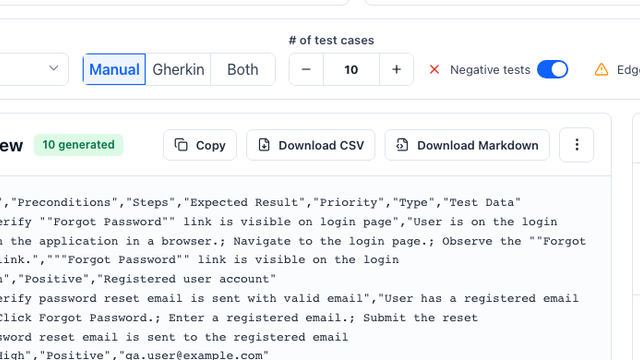
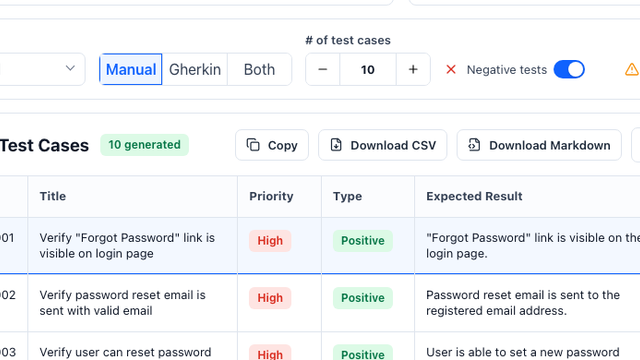
IDTitlePriorityTypeExpected Result
JIRA-001Verify reset request creates a traceable test case rowHighPositiveThe generated row includes title, preconditions, steps, expected result, priority, type, and test data.
TC-002Verify weak password is rejected during resetHighNegativeThe form blocks submission and explains the password rule that failed.
TC-003Verify expired reset link cannot be usedMediumEdge CaseThe link is rejected and the user can request a fresh reset email.
How do I generate test cases from a Jira story for free?

Copy the Jira issue key, summary, description, acceptance criteria, priority, platform, and labels into the generator. It creates a free first draft of manual test cases, Gherkin scenarios, CSV rows, Xray fields, and Zephyr-ready fields for QA review.

Which Jira test management tools can use the CSV output?

The fields are designed for common Jira-connected workflows such as Xray and Zephyr, and can also be adapted for TestRail or spreadsheet review.

Can I use an AI test case generator for Jira user stories?

Yes. Paste the Jira issue key, summary, story, description, acceptance criteria, platform, priority, labels, and component. The generator drafts manual cases, Gherkin, CSV, Xray, and Zephyr-ready rows for QA review.

Can I convert Jira acceptance criteria to test cases?

Yes. Paste the Jira issue summary, description, acceptance criteria, priority, and platform. The generator maps each criterion to positive, negative, boundary, and error-handling cases.

How do I import generated test cases into Jira?

Export the reviewed cases as CSV, choose the target workflow such as Xray or Zephyr, map required fields, run a small import test, then import the full approved set and link the cases back to the Jira story.

Can I export Jira test cases to Markdown?

Yes. Use Markdown for QA review and CSV-style exports for Jira-connected tools such as Xray, Zephyr, TestRail, or spreadsheet workflows.

Can I export generated test cases to Jira, Xray, Zephyr, or TestRail?

Yes. The generator can structure cases as a CSV-ready table with title, preconditions, steps, expected result, priority, type, and test data fields.

Does the tool replace QA review?

No. It accelerates first-draft coverage, but QA teams should review edge cases, business rules, and product-specific risks before importing cases.

What inputs produce the best test cases?

A clear user story, acceptance criteria, business rules, constraints, and examples of valid or invalid test data produce the strongest output.
Direct answer

A Jira test case generator turns a Jira user story, bug report, or acceptance criteria into reviewable QA coverage. Paste the issue key, summary, description, acceptance criteria, priority, platform, and labels, then generate manual test cases, Gherkin scenarios, CSV rows, Xray fields, and Zephyr-ready imports for QA review.

Jira user story input example

JIRA-1842: As a registered customer, I want to reset my password from the login page so that I can regain access. Acceptance criteria: registered email receives reset link, weak password is rejected, expired link is blocked, and the user sees a confirmation after reset.

How to import generated test cases into Jira

Review the generated table first, choose CSV, Xray, or Zephyr fields, map Summary, Action, Data, Expected Result, Priority, Labels, and Component, run a small import test, then attach the approved coverage back to the Jira story for traceability.

Coverage matrix

Positive, negative, boundary, and error-handling Jira coverage

Coverage typeWhat to testExample
PositiveThe Jira story succeeds for the intended user, platform, and valid data.Registered customer requests a password reset and receives a reset link.
NegativeInvalid input, blocked permission, duplicate action, or unsupported workflow.User enters a weak new password and sees the password rule that failed.
BoundaryLimits, expiry windows, minimum and maximum values, and near-threshold states.Reset link works before expiry and is rejected after the configured timeout.
Error handlingRecoverable failures, unavailable services, retries, and safe user messages.Email delivery fails and the user can retry without exposing whether an account exists.

Comparison

Jira output formats for QA handoff

Output formatBest forTypical fieldsReview before import
Manual test casesQA review and sprint handoffTitle, preconditions, steps, expected result, priority, type, test dataConfirm every acceptance criterion maps to at least one case
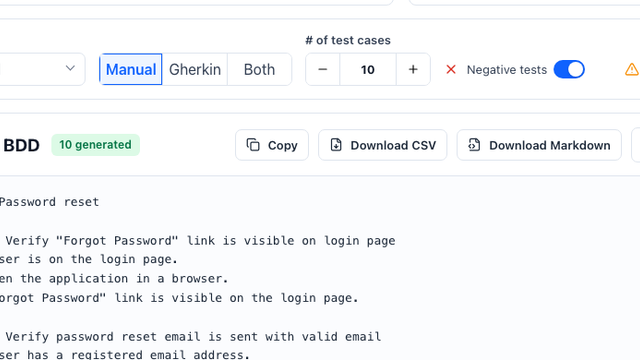
GherkinBDD review and automation planningFeature, scenario, Given, When, Then, examplesKeep wording stable before creating step definitions
CSVSpreadsheet review or generic Jira importSummary, preconditions, action, data, expected result, labels, componentCheck separators, line breaks, and required custom fields
XrayJira projects using Xray test managementSummary, Test Type, Action, Data, Expected Result, LabelsValidate Xray import mapping with a small sample first
ZephyrJira projects using Zephyr test managementName, Objective, Precondition, Test Step, Test Data, Expected Result, PriorityConfirm Zephyr field names and project permissions

Output examples

Output examples

Jira user story input

JIRA-1842 Password reset: include issue key, story, description, acceptance criteria, priority, affected platform, labels, component, and known bug context.

Xray CSV example

Summary: Verify expired reset link is blocked. Test Type: Manual. Action: open expired link. Expected Result: reset is blocked and a fresh-link path is shown.

Zephyr row example

Name: Verify weak password validation. Objective: reject unsafe password. Test Step: submit weak password. Expected Result: validation explains the failed rule.

Related tool

Jira QA workflow

Start with a Jira story or bug report, generate manual test cases, review CSV, Xray, or Zephyr fields, then use Playwright MCP for browser automation or MCP server testing for agent-based QA tools.

Open AI Jira generator

Read more

QA workflow guides

View all guides
Test Case Generator screenshot

Test Case Generator

Generate manual QA test cases, software test cases, requirements-based cases, and user-story test cases with examples and templates.

QA templates - 6 min read
Acceptance Criteria Generator screenshot

Acceptance Criteria Generator

Use the acceptance criteria generator to turn feature notes into testable rules, QA checks, and Given/When/Then examples before sprint handoff.

Acceptance criteria - 5 min read
User Story to Manual Test Cases screenshot

User Story to Manual Test Cases

See how a password reset story becomes reviewable QA cases with priorities, types, and expected results.

Guide - 6 min read
Generate Gherkin BDD Scenarios screenshot

Generate Gherkin BDD Scenarios

Turn acceptance criteria into Given / When / Then scenarios for product and engineering review.

BDD - 5 min read
Jira Test Case Generator screenshot

Jira Test Case Generator

Convert Jira stories into manual test cases, Gherkin, CSV, Xray, and Zephyr-ready QA rows for sprint review and import.

Jira QA - 5 min read
AI Test Case Generator for Jira screenshot

AI Test Case Generator for Jira

Paste a Jira story, bug report, or acceptance criteria and export Classic cases, Gherkin, CSV, Excel, Xray, or Zephyr-ready fields.

Jira workflow - 5 min read
Review Cases Before Import screenshot

Review Cases Before Import

Use the review console to inspect steps, preconditions, expected results, and suggested test data.

QA workflow - 7 min read
Generate Playwright Automation screenshot

Generate Playwright Automation

Draft Playwright MCP test steps, automation cases, and Claude Code prompts from a URL and acceptance criteria.

Playwright MCP - 6 min read
Test MCP Server Checklist screenshot

Test MCP Server Checklist

Generate smoke checks, tool-call cases, malicious input probes, permission checks, and Claude Code or Cursor prompts for MCP server testing.

MCP testing - 7 min read
AI Agent Replay Debugging screenshot

AI Agent Replay Debugging

Use a replay checklist, immutable audit log fields, trace template, and comparison table to reproduce failed AI agent interactions.

Agent QA - 6 min read
CSV, Xray, and Zephyr Export Workflow screenshot

CSV, Xray, and Zephyr Export Workflow

Format generated QA cases for CSV review, Excel handoff, and Jira-connected imports.

Export workflow - 4 min read